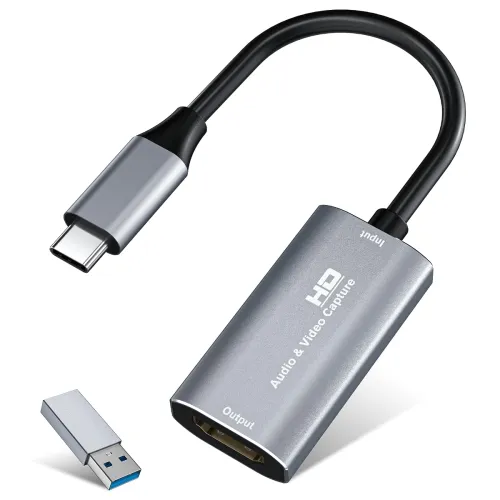
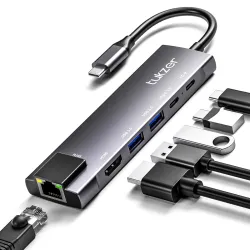
VIXLW Video Capture Card, 1080P 60FPS, 4K HDMI to USB C, USB 3.0 Capture Card for Streaming, Gaming, Video Recording Compatible with Switch, Xbox, PS4, OBS, Windows, Mac OS, Zoom(Silver)
VIXLW Video Capture Card, 1080P 60FPS, 4K HDMI to USB C, USB 3.0 Capture Card for Streaming, Gaming, Video Recording Compatible with Switch, Xbox, PS4, OBS, Windows, Mac OS, Zoom(Silver).
About
【1080P 60FPS Video Capture Card】The VIXLW HDMI game capture card delivers uncompromising image quality with HDMI input up to 4K@30Hz and output up to 2K@30Hz or 1080P@60Hz. Designed for professional streaming, gameplay recording, and conferencing, it ensures crisp, color-accurate video capture with smooth frame rates. Ideal for Nintendo Switch, PS5, Xbox, DSLR cameras, and other HDMI-output devices requiring stable, high-fidelity transmission.
【Ultra Low Latency Screen Sharing】Experience ultra-smooth performance with VIXLW HDMI capture card built for ultra low latency transmission. Designed with an advanced chipset and stable heat dissipation system, it provides real-time video and audio synchronization—no lag, no frame loss. Ideal for OBS Studio, Twitch, YouTube, and Zoom streaming, making it the best capture card for streaming and recording in any environment.
【Plug and Play, Compact & Portable】No drivers or external power needed—simply plug and play this USB video capture device to instantly start recording. With USB 3.0 high-speed interface and USB-C compatibility, you can connect seamlessly to Windows, macOS, Linux, or Android devices. Compact, lightweight, and portable, this HDMI capture card is perfect for mobile streaming setups, classroom use, or outdoor live shows. (Tip: Restart OBS Studio after setting up audio to avoid no-sound issues.)
【Wide Compatibility USB Capture Card】The VIXLW 4K capture card works perfectly with Windows 7/8/10/11, macOS, Linux, and popular software such as OBS, VLC, Zoom, and Twitch Studio. Compatible with Nintendo Switch, PlayStation, Xbox, DSLR cameras, and any HDMI-output device, it’s your all-in-one capture card for streaming and recording—ideal for YouTube content creators, teachers, or professionals hosting virtual meetings.
【Package Content & Note】HDMI Capture Card, USB 3.0 to USB-C Adapter, and User Manual. Please note that when using an adapter, if the device is recognized as USB 2.0, try flipping the capture card (using the port with the USB-C connector on the other side) and reconnecting it. It should then be recognized as USB 3.0.
Product Details
Brand
VIXLW
Hardware Interface
HDMI, USB 3.0, USB Type C
Video Capture Resolution
1080p
Operating System
Windows, macOS
Recommended Uses For Product
Streaming, Video Recording
How to get this deal
Select “Get it on Amazon”Amazon opens in a new tab
Check the price shows ₹595Deal prices can change quickly
Complete your order on AmazonOffer terms are set by Amazon
Product & offer details
Model / SKU
B0FW3K52JL
Category
Computers & Accessories
Available at
Amazon
MRP
₹1,699
Deal price
₹595
You save
₹1,104
Discount
65% off
Posted
17 Jun 2026
Last checked
17 Jun 2026
Status
Live
Pricing details
VIXLW Video Capture Card, 1080P 60FPS, 4K HDMI to USB C, USB 3.0 Capture Card for Streaming, Gaming, Video Recording Compatible with Switch, Xbox, PS4, OBS, Windows, Mac OS, Zoom(Silver) is available online in India at ₹595 (65% off) on Amazon. MRP is ₹1,699, so you save ₹1,104.
Prices and availability are accurate when posted but may change on the store. DealsSpy may be compensated if you buy through links on this site. Read our pricing disclaimer.
Saved deals
No saved deals yet
Tap the heart on any deal to keep it here for later.